Step 01
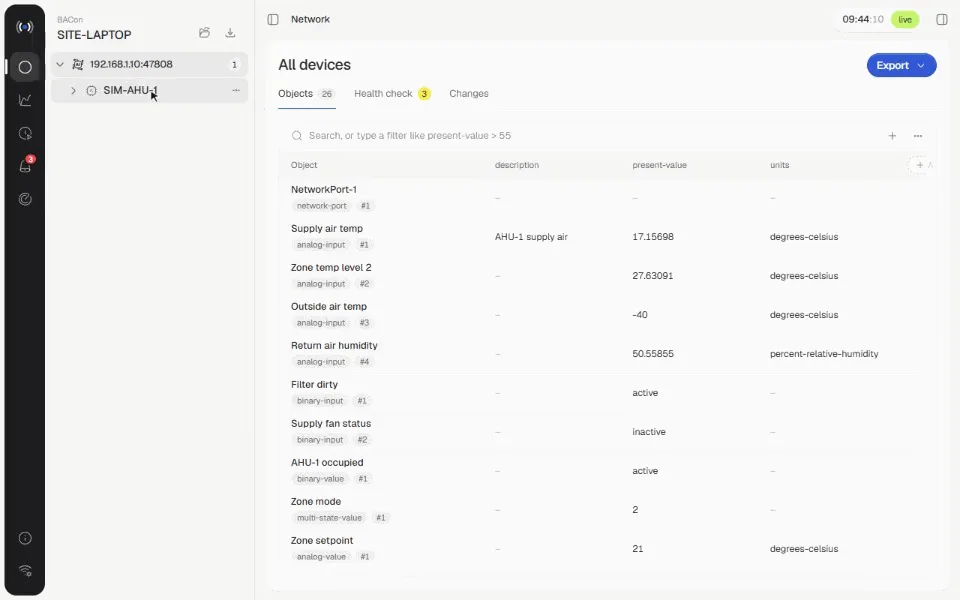
Find what's wrong with one line
Type a query like status-flags has fault or present-value > 26 and every object across every device filters to match.
BACnet, on site: scan a network, read everything, export what you pick
A read-only Windows tool for commissioning and fault-finding BACnet/IP sites. It discovers every controller, reads every property of every object, including proprietary ones, and turns what you tick into an Excel or CSV export, with queries, health checks, trends, schedules, alarms and live network diagnostics alongside.
01
Tools like YABE show you every property but can't export them, and the EDE export leaves out vendor properties such as the Siemens Input/Output address [3019], which is exactly what an I/O list needs. Building one meant clicking through objects and retyping values by hand.
02
BACon reads everything a controller reports and lets you choose the columns. A one-line query language finds faults, overrides and bad readings across every device, saved queries run as health checks on every site, and sites save to a file so you can see what changed. Trend logs bring the controller's own history with them, and it never writes to a device. It ships as a single portable exe that updates itself from GitHub releases.
// guided product tour
Six short walkthroughs on a simulated controller: find problems with one line, keep them as checks, export the columns you need, and read trends, schedules and alarms the way the controller holds them.
Step 01
Type a query like status-flags has fault or present-value > 26 and every object across every device filters to match.
Step 02
Save a query and it runs on every site you open, next to built-in checks for faults, alarms, overrides, duplicate names and missing descriptions.
Step 03
Tick any property, standard or vendor-specific, and it becomes a column in the table and in the Excel or CSV export.
Step 04
Add a controller's Trend Log and its stored history is on the chart in seconds, before you've recorded anything.
Step 05
Every Schedule object by week or month, with calendars and exceptions laid over the weekly hours, the value now and the next change.
Step 06
Alarm state and acknowledgements live from the controller, what sets each alarm off, and who gets notified.
Step 01
Type a query like status-flags has fault or present-value > 26 and every object across every device filters to match.
Step 02
Save a query and it runs on every site you open, next to built-in checks for faults, alarms, overrides, duplicate names and missing descriptions.
Step 03
Tick any property, standard or vendor-specific, and it becomes a column in the table and in the Excel or CSV export.
Step 04
Add a controller's Trend Log and its stored history is on the chart in seconds, before you've recorded anything.
Step 05
Every Schedule object by week or month, with calendars and exceptions laid over the weekly hours, the value now and the next change.
Step 06
Alarm state and acknowledgements live from the controller, what sets each alarm off, and who gets notified.
Step 01 of 06 · Find what's wrong with one line
// scope
01
Who-Is on any network adapter, optional BBMD registration, or add a device by IP.
02
Every object and every property, standard and proprietary, with clean handling of properties a device doesn't have and objects that fail to read.
03
Filter with plain words or queries like present-value > 20 and units = degrees-celsius, and save them as checks that run on every site.
04
Save a site to a .bxsite file and see what changed since the last visit.
05
Record points by COV with polling fallback, pull Trend Log history with ReadRange, lay out schedules by week or month, and read alarms with GetEventInformation.
06
Live BACnet traffic, detection of duplicate IDs, I-Am storms and error replies, and .pcap capture for Wireshark.
// built with
Next project
Kite